









Online Enrollment Service

Online Employee Benefits Enrollment Made Simple

GoBenefits provides a modern online enrollment platform that helps businesses manage employee health insurance and benefits in one central system. From new hires to open enrollment, we make the entire process simple, accurate, and compliant.

As a National Insurance Agency and benefits technology platform, we combine expert support with automation so employers can save time while employees get a smooth, self-service experience.

Online Enrollment

Reliable Coverage From a National Insurance Agency

GoBenefits partners with leading national carriers and TPAs to bring businesses reliable, flexible health insurance options. Our preferred carriers ensure competitive plans and dependable support for every group we serve.

Simplified Online Enrollment for Employers

GoBenefits removes the manual work from benefits administration.

Our online enrollment system allows employers to manage employee benefit selections, track changes, and handle documentation digitally, without spreadsheets, paperwork, or back-and-forth emails.

Whether you’re onboarding new employees or running annual open enrollment, everything happens inside one secure platform.

Simplified Online Enrollment

One-Click Enrollment & Life Event Changes

Employees can enroll, update, or modify their benefits through a simple online interface.

Life events such as

  • Marriage or divorce

  • New dependents

  • Address changes

  • Employment status updates

It can be managed instantly, ensuring coverage stays accurate and up-to-date without HR intervention.

One-Click Enrollment & Life Event Changes

QuickBooks Integration for Automated Payroll Sync

GoBenefits integrates directly with QuickBooks Online to automate employee benefits workflows.

With QuickBooks integration, you can:

  • Sync new hires automatically into your benefits system

  • Trigger enrollment and termination workflows

  • Keep payroll and benefits data aligned

  • Reduce manual data entry and errors

This creates a seamless connection between payroll and benefits administration, saving hours of operational work every month.

ACA-Compliant Insurance Quoting for Employers

Centralized Benefits Management Platform

GoBenefits gives employers a single system to manage:

  • Medical, dental, and vision benefits

  • Disability and supplemental coverage

  • Employee contributions and plan selections

  • Documents and compliance records

Everything is stored in one dashboard, making benefits management clear, organized, and easy to maintain.

Centralized Benefits Management Platform

Built for Compliance and Accuracy

Our online enrollment platform supports ACA compliance requirements by maintaining accurate employee records and coverage data.

This helps businesses:

  • Track eligibility and participation

  • Maintain clean reporting data

  • Stay prepared for audits and filings

  • Avoid compliance risks

You’re not just enrolling employees; you’re building a compliant benefits infrastructure.

Built for Compliance and Accuracy

Manage Employee Benefits Online

Streamline enrollment, sync payroll, and simplify benefits administration with GoBenefits.

Why Businesses Use GoBenefits for Online Enrollment

A Modern Benefits Platform

GoBenefits combines insurance expertise with technology to create a smarter way to manage employee benefits digitally.

Integrated with Payroll Systems

Our QuickBooks integration connects payroll and benefits, reducing duplication and manual processing.

Self-Service for Employees

Employees manage their own enrollments and updates, reducing HR workload and improving accuracy.

Centralized Data Management

All benefits, documents, and employee records live in one secure system.

Ongoing Support from a National Insurance Agency

You get real human support, not just software. Our team helps you with setup, changes, and long-term benefits strategy.

Manage Employee Benefits Online

Streamline enrollment, sync payroll, and simplify benefits administration with GoBenefits.

Hear It From Our Clients

RE
Reagan C. jun 27,2025

Owner

★★★

Owner/Operator

I can’t say enough good things about GoBenefits. Their system is user friendly and easy to use. The support is by far one of the best. They are highly responsive,... Read More

View more reviews for GoBenefits on G2
JE
Jennifer A. jun 24,2025

Owner

★★★★★

Great Health Care Management Team

We are a small company (franchise) with under 50 Full time people. Getting coverage for the employees while making it affordable and within reason was a challenge.

View more reviews for GoBenefits on G2
JO
John P. jun 19,2025

Owner

★★★★★

GoBenefits Rocks!

We were using another platform but that was hard to use. GoBenefits was very intuititive.

View more reviews for GoBenefits on G2
KA
Kathy M. Jun 3, 2022

Human Resources Director

★★★★★

“Human Resources Director”

Great extension if you shop a lot online. It really makes you a lot more educated about the products you are trying to buy. The ratings are right on the... Read More

View more reviews for GoBenefits on G2

How Insurance Quoting Works with GoBenefits

Getting business health insurance quotes with GoBenefits is simple and fully digital. Our guided process helps you move from sign-up to employee enrollment in just a few easy steps.

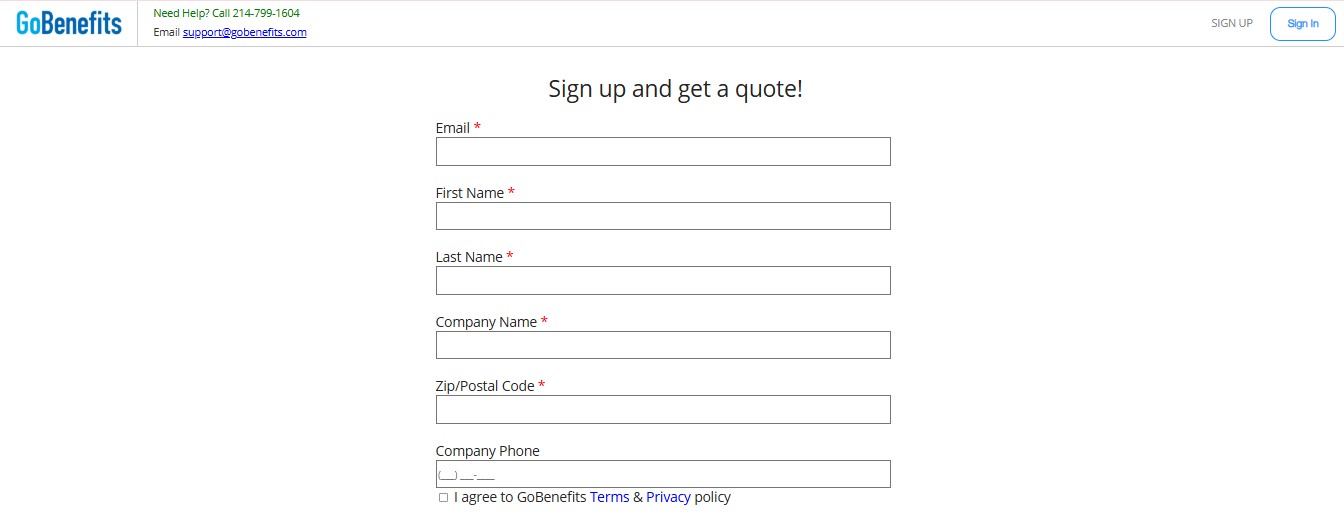
Step 1: Sign Up & Access Your Dashboard

Create your GoBenefits account to access your secure business dashboard. This is where you manage your company details, employees, and insurance activity in one place.
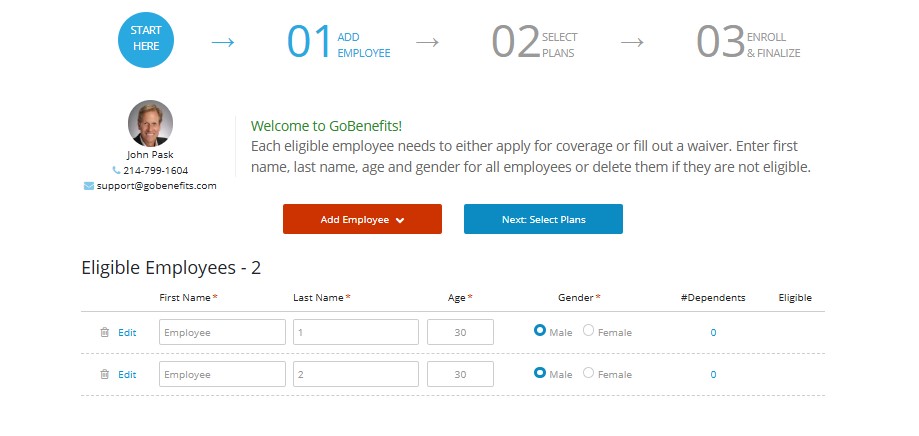
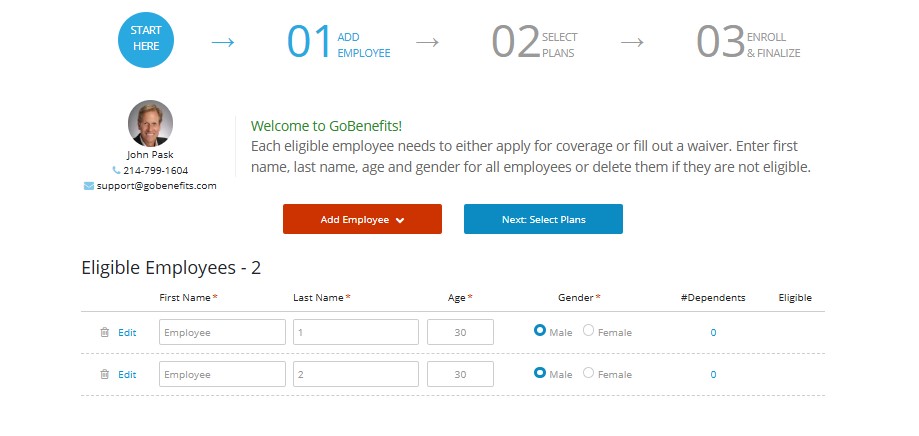
Step 2: Add Your Employees

Enter basic employee information such as location, roles, and coverage needs. This data helps generate accurate group health insurance quotes based on your workforce.
Step 4: Enroll & Finalize Coverage

Once plans are selected, complete enrollment digitally. GoBenefits handles the process and supports you through setup, documentation, and next steps.
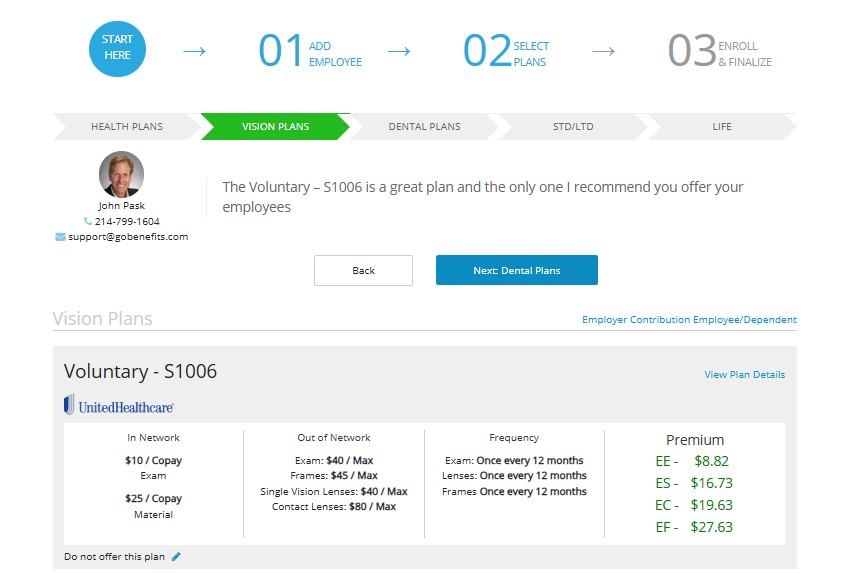
Step 3: Compare & Select Plans

View and compare group health insurance plans such as PPO’s, EPO’s, HMO’s and vision and dental plans. Review premiums, coverage levels, and plan types before selecting the best options for your team.
Frequently Asked Questions

1. How long does it take to get group health insurance quotes?

Online employee benefits enrollment allows employers and employees to manage health insurance and benefit selections through a digital platform instead of paper forms or spreadsheets. With GoBenefits, everything from plan selection to documentation happens online in one secure system.

Online enrollment reduces manual HR work by automating benefit selection, approvals, and record keeping. It saves time, minimizes errors, and gives you a clear overview of employee coverage without chasing emails or paperwork.

No. GoBenefits handles the setup for you. Once your plans and employee data are added, your team can start enrolling immediately. Most businesses can be fully set up in a short time with guided support from our team.

Yes. Employees get a self-service portal where they can view plans, enroll, update details, and manage life event changes like adding dependents or changing coverage, without HR involvement.

Yes. GoBenefits integrates with QuickBooks Online, allowing payroll and benefits data to sync automatically. This helps keep employee records accurate and reduces duplicate data entry.

Absolutely. The platform supports:

  • New hire onboarding
  • Annual open enrollment
  • Life event changes
  • Employee terminations

All through the same system.

Yes. The platform maintains accurate employee data and coverage records to support ACA compliance and reporting requirements for eligible employers.

You get both. GoBenefits combines automation with real expert support, so you’re never left figuring things out alone. Our team assists with setup, questions, and ongoing management.